Sam’s Club
FingerBot’s Sam’s Club module is fully automatic and requests based. It monitors the FingerAIO Discord for any matching and armed SKU tasks. Sam’s Club TCG offerings tend to require paid accounts, occasionally requiring the Plus membership to purchase (but will be announced prior to the drop). I highly advise against manually attempting ATC and/or checking out while FingerBot is running (on the same account).
General Layout
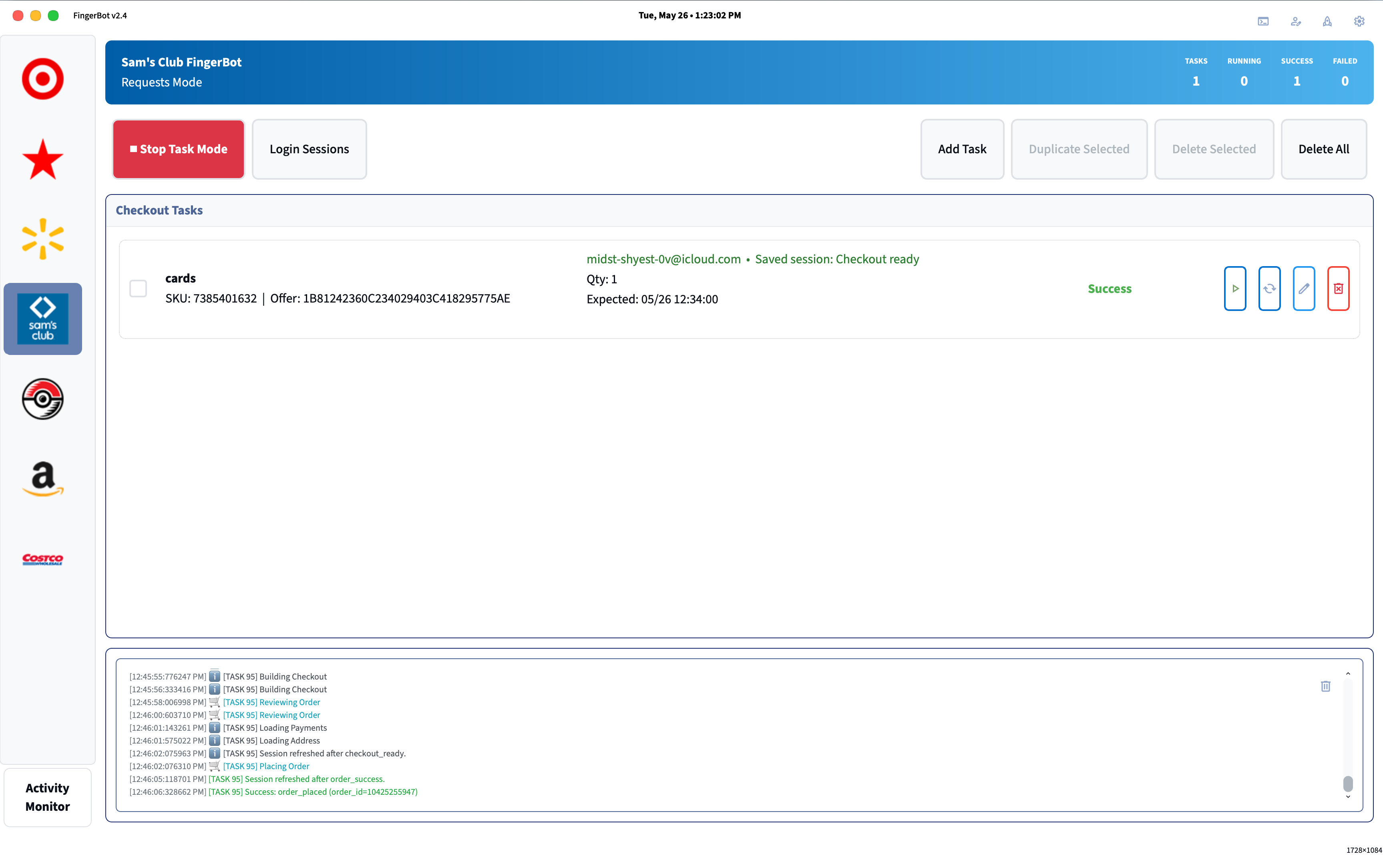

From left to right, each button’s functionality is as follows:
- Start/Stop Task (automatically logs in the attached account on start if necessary)
- Check/Refresh Task (check if task is still logged in)
- Edit Task
- Delete Task
Setup
Before continuing, complete account setup in the Profiles Setup: Account Profiles and Email Monitoring Accounts (required for 2FA codes during login).
Task Setup
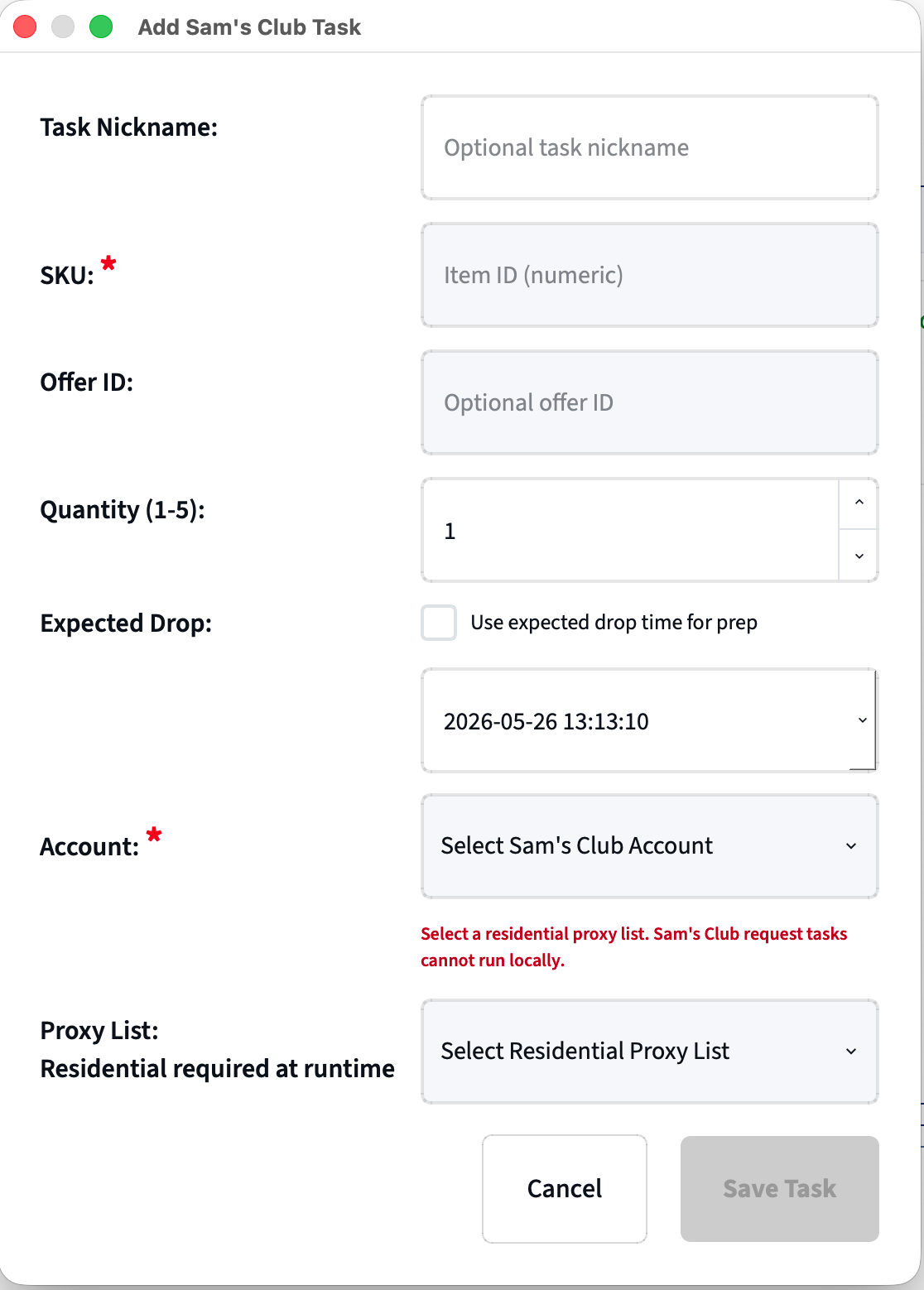
-
Task Nickname (Optional)
- Only used by the user to help differentiate tasks.
-
SKU (REQUIRED)
- Sam’s Club item SKU, can be found in the item’s URL
-
Offer ID (Optional)
- Sam’s Club offer ID will be provided to you in advance. Check in the FingerAIO Discord. Allows FingerBot to skip intermediate steps to expedite the checkout process.
-
Quantity
- Number you wish to purchase. Typically hyped items have a limit of 2.
-
Expected Drop
- Check this box and set a time for the expected drop time for the item (if applicable). Not used directly in runtime, only used to ensure a proper logged in session when drop time nears.
The scheduled timer uses 12-hour AM/PM format and is based on your local timezone
-
Account
- Choose the account that this task should use. The account status is shown underneath and shows if the account is already logged in (may show incorrectly)
-
Proxy List (REQUIRED)
- Choose what proxy list this task should use. I recommend using a residential proxy. UNDER NO CIRCUMSTANCES SHOULD YOU RUN WITHOUT A PROXY.
Important Things to Note
When creating tasks, FingerBot follows a strict rule of one task per account. Running additional tasks on the same account may lead to increased issues, account locks, etc.
ONE ACCOUNT PER SKU, NO EXCEPTIONS.
Tips and Suggestions
- It’s recommended to login your tasks roughly 20-30 minutes before a drop. All you need to do is start a task and it should automatically sign you in via 2FA code (email).
- Make sure that you have a saved/default payment method in your Sam’s Club account
- Make sure to add/update your default payment method’s CVV number in Profiles Setup.
Troubleshooting
| Problem | Fix |
|---|---|
| OTP not received within timeout (120s) | Confirm your email monitoring account is set up in Profiles → Email Accounts and the App Password is valid |
| Checkout failing — no saved address | Log into samsclub.com and add a shipping address to your account |
| Checkout failing — no saved payment | Log into samsclub.com and add a payment method to your account |
| Bot not triggering from Discord | Make sure that the task SKU is correct. Contact support if drops are consistently being missed. |
| Anti-bot block | FingerBot will try and automatically recover from PX blocks but this is sometimes unavoidable. Try restarting tasks with different proxies. |
| No Discord notification after success | Open Settings → Discord tab and confirm your webhook URLs are saved |