Walmart
FingerBot monitors the FingerAIO Discord and automatically queues for items or performs fully automated checkouts. Walmart requires accounts to checkout collectibles & trading cards. Make sure that you have at least one available. Some drops are specifically for Walmart+ members but will be announced prior to the drop.
Modes at a Glance
| Mode | What It Does | Setup Required |
|---|---|---|
| Browser-based queue opener | Monitors FingerAIO Discord for Walmart queue pings and opens them in your local Chrome. You complete checkout manually. | Must be logged into Walmart in your normal Chrome browser |
| Request-based fully automated checkouts (IN TESTING) | Monitors specific product endpoints to join queue as quickly as possible, waits in queue and checks out for you. | Walmart accounts w/ email monitoring, default shipping/payment set in Walmart accounts. Residential/ISP proxies needed. |
General Layout
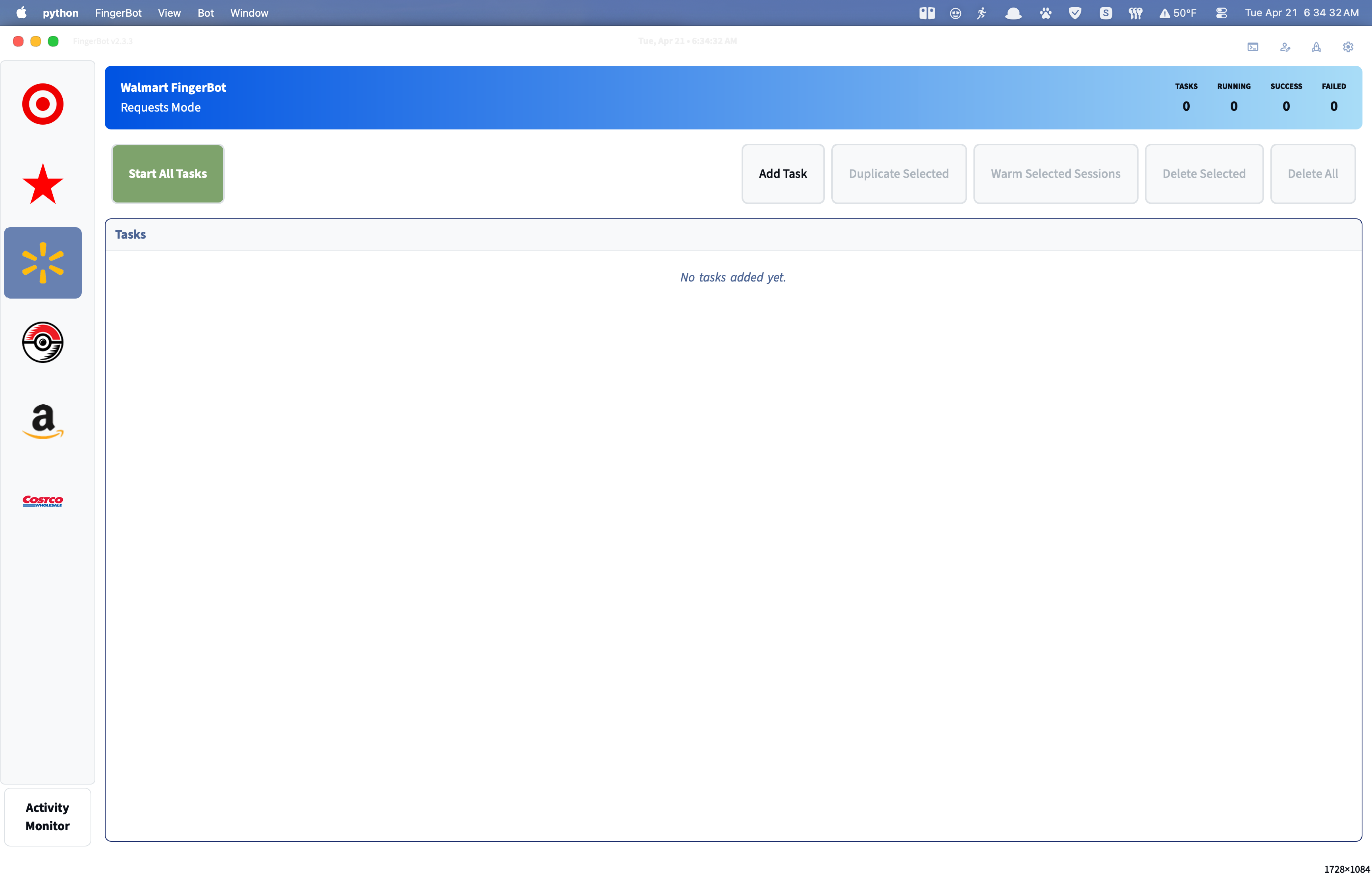
Requests-Based Setup
Before continuing, ensure that you’ve fully setup everything in Profiles Setup, Account Profiles, and Email Monitoring (required for 2FA codes during login).
Task Setup
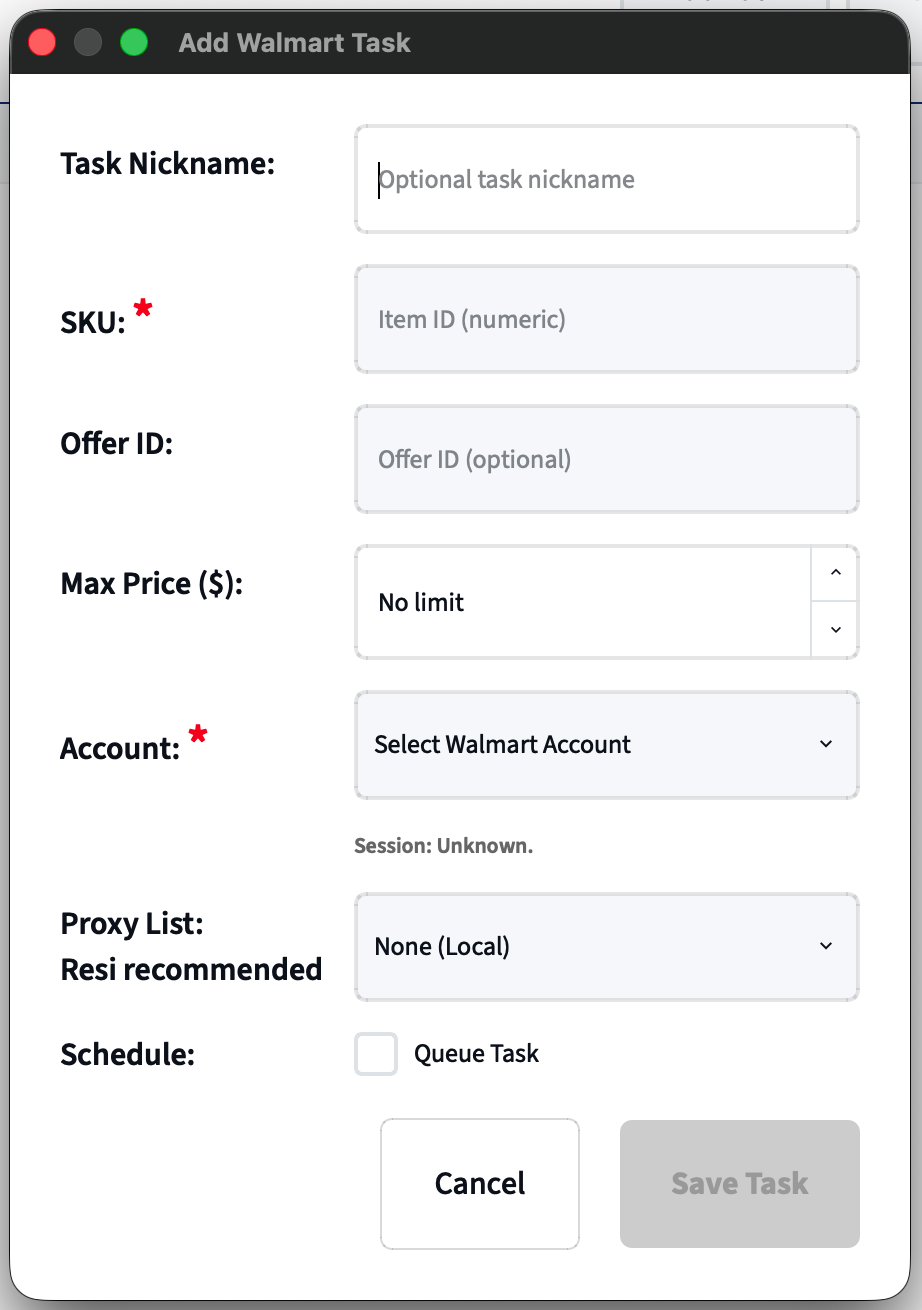
- Task Nickname (Optional)
- Only used by the user to help differentiate tasks.
- SKU (REQUIRED)
- Walmart item SKU, can be found in the item’s URL
- Offer ID - Optional but recommended, Allows FingerBot to expedite the checkout process. (Not needed for queue tasks)
- Max Price (Optional but recommended)
- Set a max price for the task item. This is the item subtotal before taxes and fees.
- Account
- Choose the account that this task should use. The account status is shown underneath and shows if the account is already logged in (work in progress).
- Proxy List (REQUIRED)
- Choose what proxy list this task should use. I recommend using a residential proxy. UNDER NO CIRCUMSTANCES SHOULD YOU RUN WITHOUT A PROXY.
- Schedule
- Check this box if this task if for an upcoming queue. Set the time exactly the time that items are suppose to drop - Walmart Wednesday is at 9pm EST.
Important Things to Note
When creating tasks for known queue drops, it’s incredibly important to remember that FingerBot follows a hard rule: ### ONE ACCOUNT PER QUEUE, NO EXCEPTIONS.
Troubleshooting
| Problem | Fix |
|---|---|
| OTP not received within timeout (90s wait, then 210s after a resend) | Confirm your email monitoring account is set up in Profiles → Email Accounts and the App Password is valid |
| Checkout failing — no saved address | Log into Walmart.com and add a shipping address to your account |
| Checkout failing — no saved payment | Log into Walmart.com and add a payment card to your account |
| Bot not triggering from Discord | Make sure FingerBot is running and connected to Discord. Contact support if drops are consistently being missed. |
| Queue links not opening in browser | Make sure Chrome is installed and you are logged into Walmart in Chrome (Open Queues Only mode only) |
| Anti-bot block | FingerBot will try and automatically recover from PX blocks but this is sometimes unavoidable. Try restarting tasks with different proxies. |
| No Discord notification after success | Open Settings → Discord tab and confirm your webhook URLs are saved |
Tips and Recommendations
- Walmart turns the security way up around drop times, it’s recommended to sign prior to the drop to avoid any issues. I recommend at least 1 hour in advance.
- Walmart is a numbers game. The more accounts you run, the better chance at success you’re likely to see. 15+ accounts should give you an adequate chance at hitting.
At this time, DO NOT run more than 20 tasks at once. FingerBot’s Walmart module is currently not equipped to handle that many tasks at once. I will continue to optimize the code to increase the number of task in the future.